Historique de presse-papiers pour étudiants sur Mac
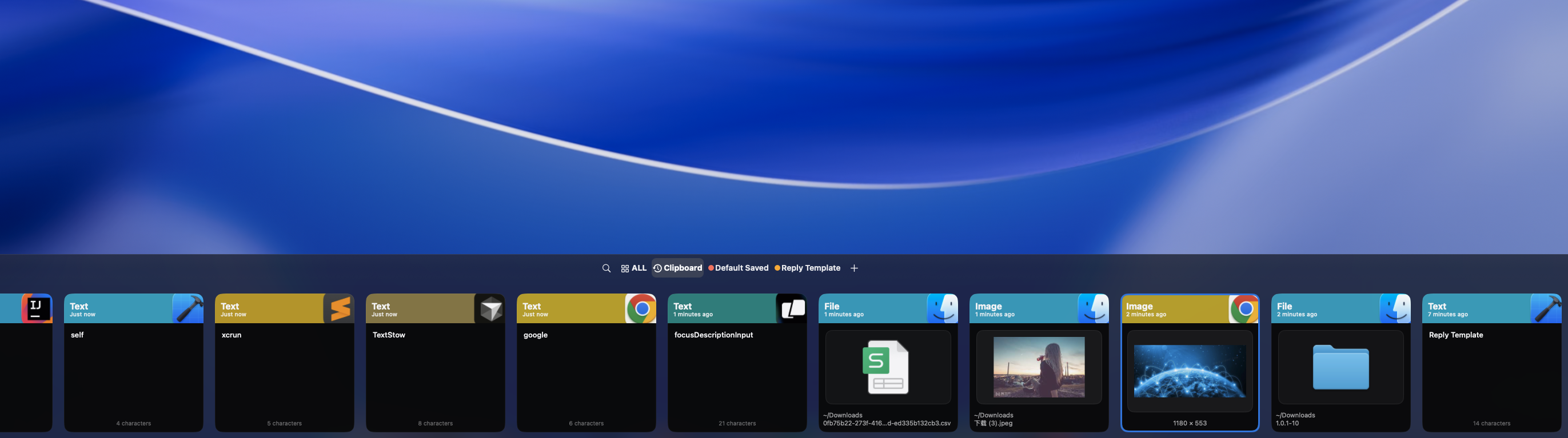
Les étudiants copient constamment depuis des manuels, des notes de cours, des articles web et des PDF. Sans historique de presse-papiers, les citations et références utiles se perdent entre les onglets. TextStow conserve tout votre matériel d'étude copié en un seul endroit consultable.
Nettoyez automatiquement le texte des PDF
Le texte copié depuis des PDF a souvent des sauts de ligne brisés et un espacement désordonné. Les outils de réparation de texte intégrés de TextStow nettoient le texte PDF copié avant de le coller dans votre essai ou vos notes. <a href="/fr/use-cases/best-clipboard-manager-students-mac/">Découvrez le meilleur gestionnaire de presse-papiers pour étudiants.</a>
Keep Everything You Copy in One Searchable Place
TextStow automatically records every piece of content you copy from any source — PDFs, browsers, Word documents, PowerPoint slides, note-taking apps. Switch between research papers, lecture notes, and your essay draft without losing anything you copied earlier. Access your entire copy history from the menu bar with full-text search.
Fix Broken PDF Text Before Pasting into Essays
Academic PDFs are notorious for breaking text: mid-sentence line breaks, random spacing, hyphenated words, multi-column layouts, and header/footer pollution. TextStow built-in PDF text repair tools clean copied PDF text automatically before you paste it into your essay, research notes, or bibliography. <a href="/fr/tools/pdf-text-repair-mac/">Fix messy PDF text copied on Mac.</a>
Bookmark Key Quotes, Citations, and References Permanently
Important quotes, book citations, reference URLs, and bibliography entries can be bookmarked permanently with descriptive titles and categories like "Essay 1", "Thesis Research", or "Biology Citations". They survive history clears and are always one search away when writing papers. <a href="/fr/use-cases/save-research-notes-mac/">Learn how to save research notes and citations on Mac.</a>
Organize Study Material by Subject or Project
Use TextStow categories and tags to organize copied content by course, subject, or research project. Find all quotes copied for your History essay, all formulas for Physics homework, or all references for your Biology thesis — instantly searchable and locally stored.
Local Storage Keeps Research Private and Works Offline
Your research notes, essay drafts, and copied citations stay on your Mac — no cloud sync, no account required, no data sent to third-party servers. TextStow works completely offline, perfect for library study sessions, classroom use, or anywhere without reliable internet.
Questions fréquentes
TextStow peut-il aider pour la rédaction de mémoires ?▾
Oui. Il conserve toutes vos citations, références et notes copiées accessibles pendant vos recherches et votre rédaction.
Fonctionne-t-il avec les manuels PDF ?▾
Oui. TextStow enregistre le texte copié depuis les PDF et inclut des outils pour nettoyer le formatage brisé.
TextStow est-il gratuit pour les étudiants ?▾
TextStow est gratuit à télécharger et utiliser pour la version actuelle.
Fonctionne-t-il hors ligne ?▾
Oui. TextStow fonctionne entièrement hors ligne — idéal pour la bibliothèque ou la salle de classe.
Does TextStow work offline in the library or classroom?▾
Yes. TextStow works completely offline — perfect for studying anywhere without internet access.
Can I organize copied notes by subject or course?▾
Yes. Use categories and tags to organize content by course, subject, research project, or any system that fits your study workflow.
Téléchargement gratuit TextStow
Les étudiants copient constamment depuis des manuels, des notes de cours, des articles web et des PDF. Sans historique de presse-papiers, les citations et références utiles se perdent entre les onglets. TextStow conserve tout votre matériel d'étude copié en un seul endroit consultable.
Téléchargement gratuit