
Never lose a copy. Keep favorites handy.
Automatically save clipboard history, organize frequently used content, and process text from one Mac menu bar app.
Do These Sound Familiar?
Happening every day — you just got used to it
"The order number I just copied got replaced"
Copy from chat to browser, then browser to doc — by the 3rd copy, your order number is gone forever. Digging through chat history takes 2 minutes.
"Where did I save that reply template?"
Support/sales sends dozens of similar replies daily. Digging through folders, notes, and chat logs — or creating a new one? Templates get messier over time.
"The PDF copy has broken formatting everywhere"
Copied a product description for a report — broken lines, extra spaces everywhere. Manually fix? Or retype? You spent 5 minutes formatting a 50-word paragraph.
Core Features
One tool for all your text needs
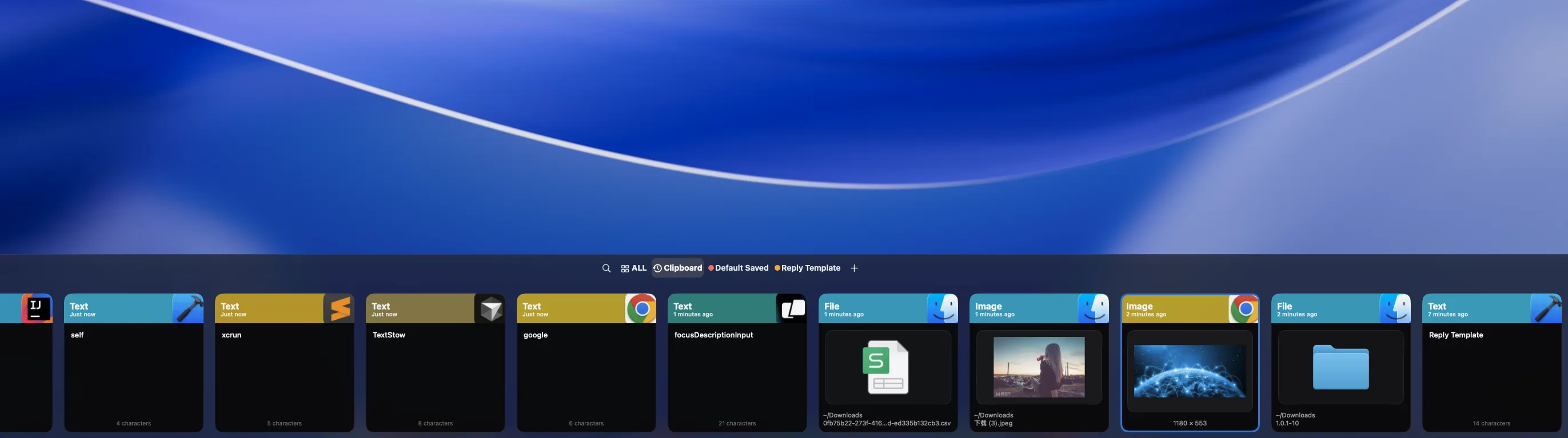
Clipboard History
Just copy — TextStow remembers everything. Every copy from the last 7 or 30 days is automatically saved — text, images, files, all in reverse chronological order.
- Auto-record every copy, zero effort required
- Support text, images, and files
- Full-text search + filter by type/time/source app
- Double-tap Option to open, stay in your workflow
Content Bookmarks
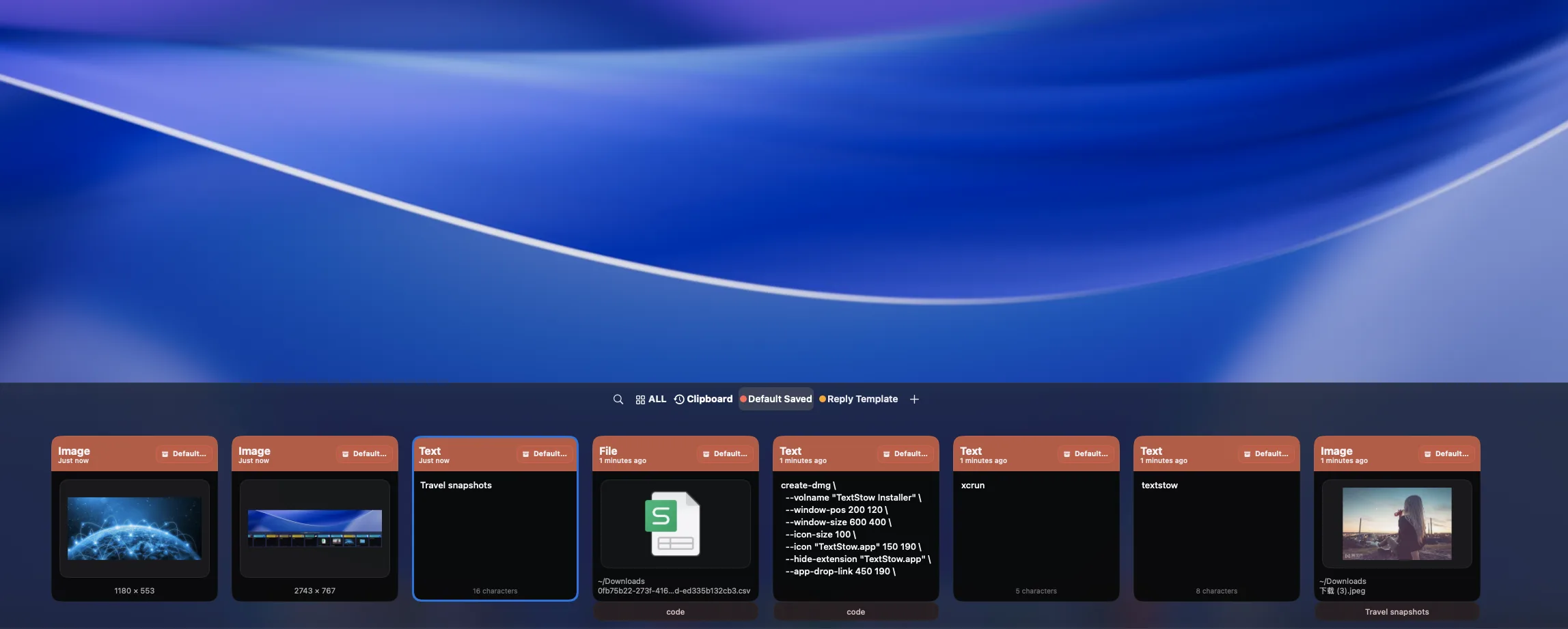
Save frequently used content, organize by categories, and access anytime. Reply templates, code snippets, email signatures — create once, use forever.
- Bookmark text, images, and files in one click
- Category + tag organization, everything stays tidy
- Usage stats — most used on top
- Permanent storage, independent of history cleanup
Text Processing Toolbox
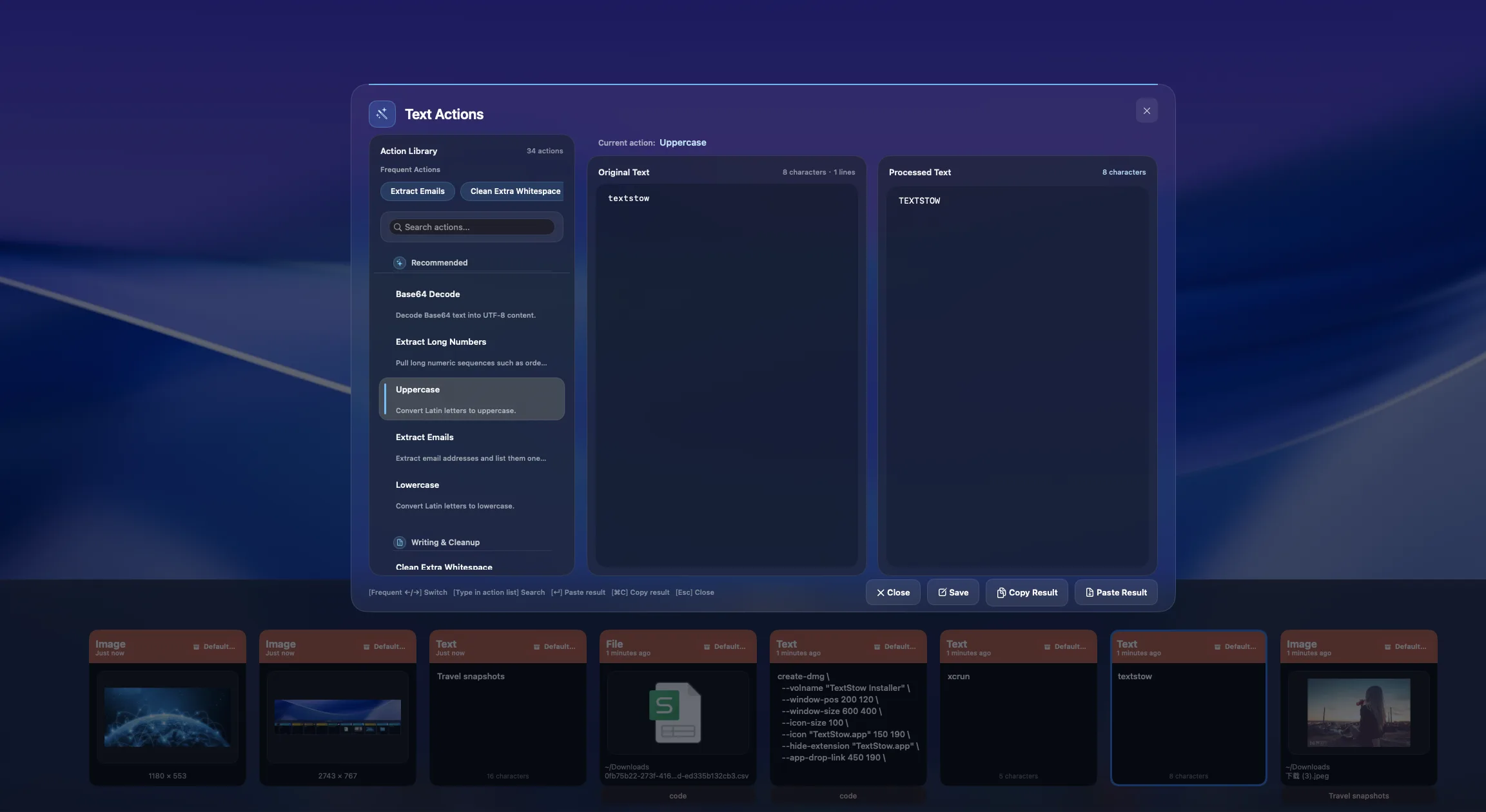
Wrong text format? Clean it in one click. 30+ built-in tools — whitespace cleaning, JSON formatting, PDF text repair — no external tools or websites needed.
- Whitespace cleaning: remove extra spaces, blank lines, merge line breaks
- JSON format / Base64 encode/decode / URL encode/decode
- PDF text repair: fix broken lines in one click
- Smart recommendation for the best tool based on content
Instant Search
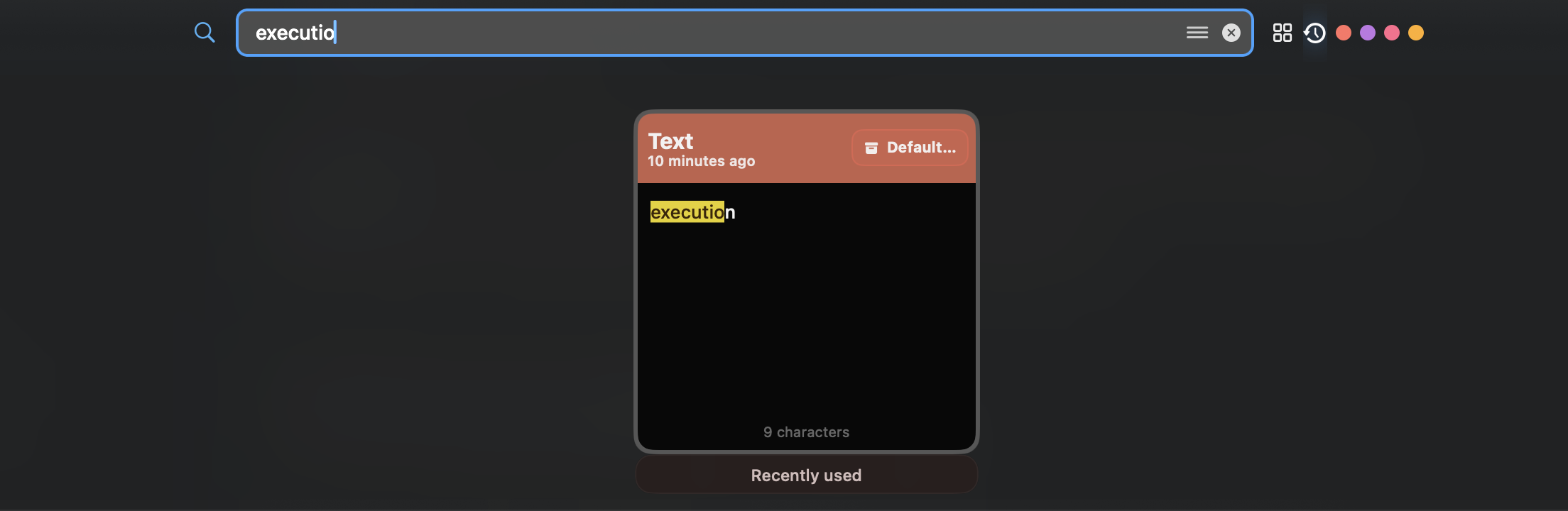
Type and search — zero-delay feedback. Full-text search, fuzzy matching, keyword highlighting — find any item in milliseconds, no more scrolling through lists.
- Instant search, zero delay
- Full-text + fuzzy matching, find it even if you forget details
- Smart keyword highlighting, spot it at a glance
- Multi-dimensional filters by category, tag, type, and time
Use Cases
One tool for all your text needs
Clipboard History
Just copy — TextStow remembers everything. Every copy from the last 7 or 30 days is automatically saved — text, images, files, all in reverse chronological order.
Instant Search
Type and search — zero-delay feedback. Full-text search, fuzzy matching, keyword highlighting — find any item in milliseconds, no more scrolling through lists.
Text Processing Toolbox
Wrong text format? Clean it in one click. 30+ built-in tools — whitespace cleaning, JSON formatting, PDF text repair — no external tools or websites needed.
Blog
Clipboard History
What Users Say
Early users on where TextStow fits into daily work
"I mainly use it to recover things I just overwrote — commands, API URLs, and error messages. It saves me from digging through chat or terminal history."
"Bookmarks are cleaner than keeping templates in Notes. Design comments, review notes, and color values are easier to pull up during meetings."
"PDF copies often bring broken line breaks. Text cleaning is not flashy, but using it a few times a day makes writing less annoying."
"We keep support reply snippets in it. Batch organization could still improve, but search and bookmarks already replace a lot of scattered docs."
"JSON formatting, Base64, and whitespace cleanup make sense next to the clipboard. I do not need to open a website for every small text fix."
"Local storage was the reason I tried it. Client notes and drafts should not go through an online clipboard, and the menu bar app stays out of the way."
Why TextStow
Free to download and use
TextStow is free to download and use with no subscription required for the core local clipboard workflow. If pricing changes in the future, we will keep the model clear and transparent.
100% Local Storage
All content in local SQLite database, zero network transfer, works offline. Your contract drafts, passwords, code snippets — only yours.
Always in Menu Bar
Lives in your menu bar with minimal resource usage. Double-tap Option to summon, auto-dismisses when done — low presence, high efficiency.
Frequently Asked Questions
Common questions about TextStow
What is TextStow?▾
TextStow is a lightweight clipboard management tool that runs in the macOS menu bar. It automatically records everything you copy (text, images, files) and provides a bookmark feature to save and categorize frequently used content for quick access. It also includes 30+ built-in text processing tools.
Is TextStow free?▾
TextStow is free to download and use. You can use the core local clipboard workflow, including clipboard history, content bookmarks, and text processing tools.
Which macOS versions does TextStow support?▾
TextStow supports macOS 13.0 (Ventura) or higher, including both Apple Silicon (M1/M2/M3) and Intel processors.
Does TextStow upload my data to the cloud?▾
No. All TextStow data — including clipboard history, bookmarks, images, and files — is stored in a local SQLite database with zero network transfer. It works offline. Your data belongs only to you.
What languages does TextStow support?▾
Supports Simplified Chinese, English, German, Spanish, French, Japanese, and Korean.
Are bookmarks automatically cleaned up?▾
No. Bookmarks are permanently saved, independent of the clipboard history cleanup policy. Unless you actively delete them, bookmarks will always be there.
Download Free, Try Now
Join thousands of Mac users who save time every day with TextStow. Free to download, no signup required.
Free Download