Clipboard History for Mac
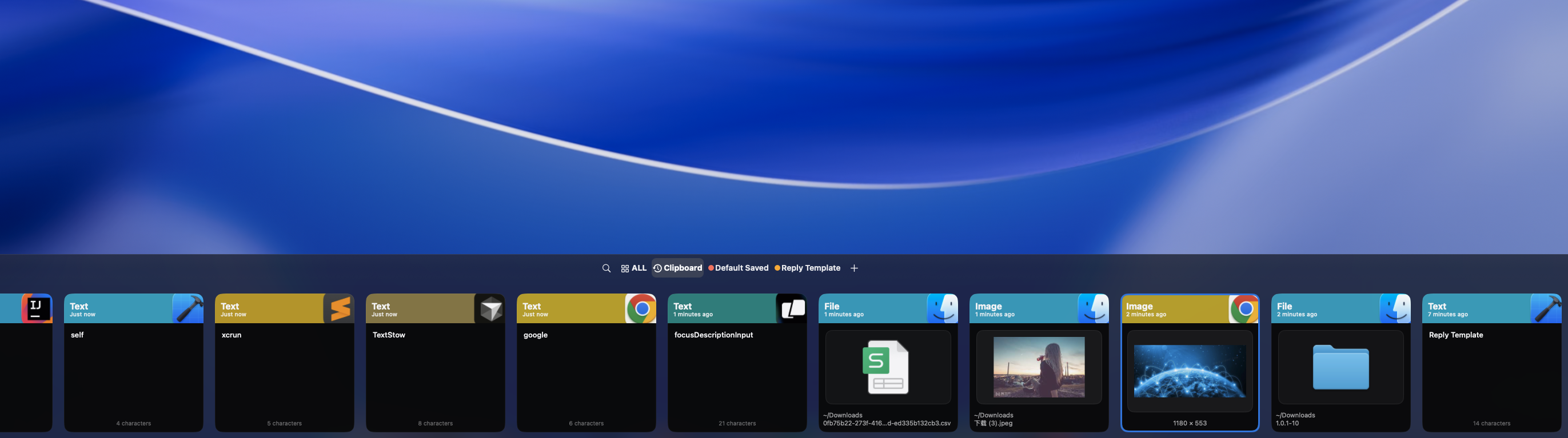
Spotlight Clipboard History can help you find recent copied items on supported macOS versions. If you are asking where the clipboard is on a Mac or how to find an older copy, TextStow adds a local searchable history for text, images, and files, plus permanent bookmarks and text tools for content you need to find and reuse over time.
What macOS Remembers
The active clipboard normally contains the latest item you copied. Some macOS versions and system features can expose recent clipboard history, but the controls and retention behavior depend on the setup. Treat recent system history as a way to locate a recent item, not automatically as a permanent searchable archive.
System Clipboard vs Local Clipboard History
The current clipboard is designed for immediate paste. Recent system history may expose more than one item. A clipboard manager such as TextStow is useful when you need a longer-term local record, full-text search, bookmarks, filters, or a way to reuse text, images, and files after several later copies.
TextStow Records Everything Automatically
Just copy as you normally would. TextStow runs in the menu bar and silently saves every text snippet, image, and file you copy. No extra steps, no keyboard shortcuts to remember — it works the moment you install it.
Full-Text Search Across Your History
Need something you copied last week? Type a few remembered words into TextStow and filter by type (text, image, file), time range, or source app. Finding old copied content takes seconds instead of digging through browser tabs and chat messages.
How to Recover an Older Copy
First try the active clipboard with Command-V, then check any recent system history available on your Mac. If the item was copied while TextStow was already recording, search its local history by words, content type, time, or source app. A clipboard manager cannot recover an item that was never recorded.
Privacy-First, Local-Only Storage
All clipboard data stays on your Mac. TextStow does not upload anything to the cloud, does not require an account, and works completely offline. Your copied content — including potentially sensitive material — never leaves your machine.
Frequently Asked Questions
Does macOS have a built-in clipboard history?▾
Supported macOS versions can provide Clipboard History through Spotlight. Check Apple's current documentation and your system settings for availability. TextStow is for people who also need a local searchable history, permanent bookmarks, and text tools.
Does macOS remember the clipboard after I copy something else?▾
The active clipboard normally contains the latest copy. A supported macOS Clipboard History feature can expose recent items, while TextStow keeps a longer-term searchable local history of copied text, images, and files.
What is the difference between clipboard history and the active clipboard?▾
The active clipboard is the item used by the next Command-V paste. Clipboard history is a record of earlier copies. The amount of history available depends on the system feature or clipboard manager you use.
Does TextStow save images and files too?▾
Yes. TextStow records text, images, and files that you copy, not just plain text.
Can I search my clipboard history?▾
Yes. TextStow provides full-text search with filters by content type, time, and source application.
Is clipboard data stored locally or in the cloud?▾
All data is stored locally on your Mac. TextStow does not sync to the cloud or require any account.
Does TextStow work offline?▾
Yes. TextStow works completely offline with no network dependency.
Free Download TextStow
Spotlight Clipboard History can help you find recent copied items on supported macOS versions. If you are asking where the clipboard is on a Mac or how to find an older copy, TextStow adds a local searchable history for text, images, and files, plus permanent bookmarks and text tools for content you need to find and reuse over time.
Free Download