Content Bookmarks for Mac
TextStow is not just a clipboard history tool. Its bookmarks feature lets you permanently save valuable text snippets, reference images, and frequently used files — all searchable and organized locally on your Mac.
Clipboard History Is Temporary — Some Content Deserves Permanent
Clipboard history records everything you copy, but it is a timeline — old items eventually get pushed out by new copies and can be cleared when you clean your history. Some content is too valuable to lose: email template replies, code patterns you reuse weekly, reference screenshots, product images for listings, document templates, and frequently used config values.
Bookmarks Keep What Matters Forever
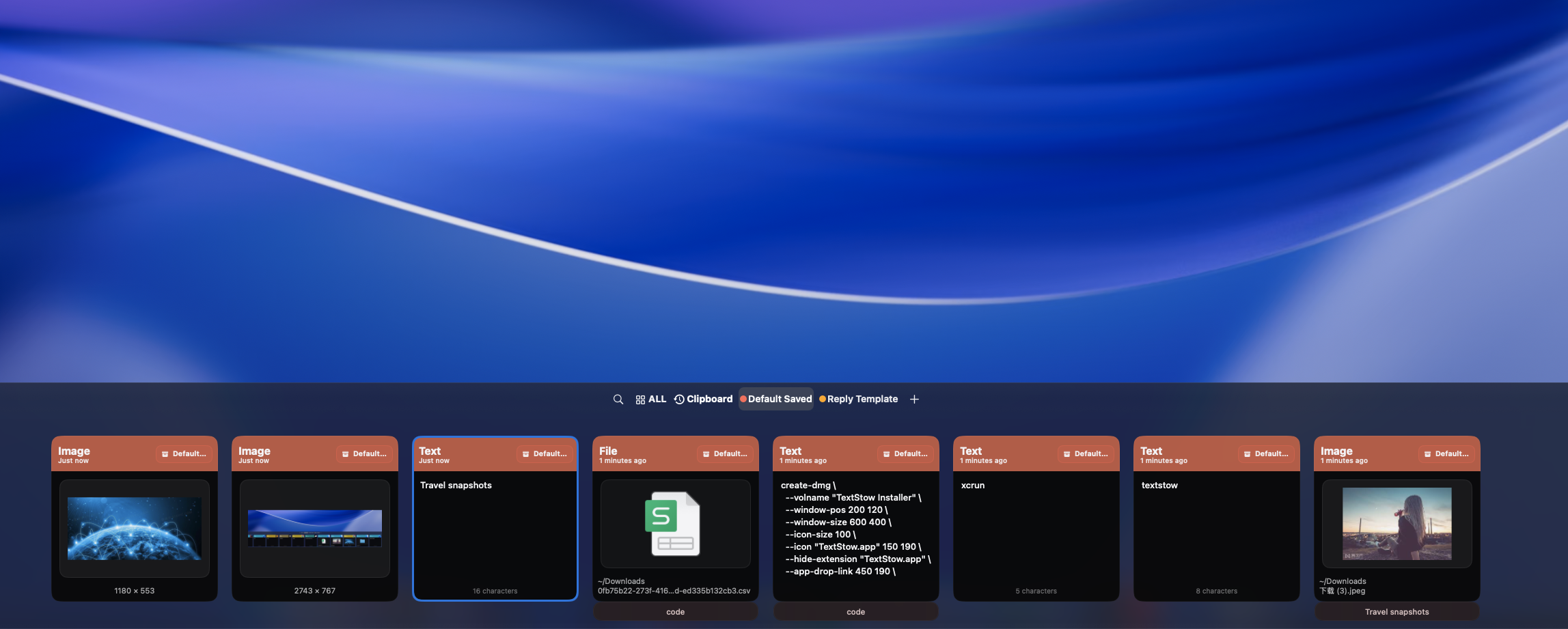
When you copy content worth keeping long-term, bookmark it in TextStow with a single click. Add a descriptive title, assign it to a category, and it becomes part of your permanent content library. Bookmarks survive history clears and are always one search away — building a personal knowledge base from your daily copy-paste workflow.
Text Snippets, Images, and Files — All Bookmarkable
Bookmark anything from your clipboard: reusable email replies and customer support templates, code patterns and API calls, config values and environment variables, reference screenshots and error messages, product images and document templates, frequently used files. TextStow supports text, images, and files in bookmarks — not just plain text.
Categories and Tags Organize Your Collection
Organize bookmarks by project, client, course, or workflow. Categories like "Email Templates", "Code Snippets", "Product Listings", or "Research Citations" keep your collection structured. Add tags for even finer organization. Whether you saved a snippet last week or an image last month, categories and search make it instantly findable.
Search and Filter Your Bookmark Library Instantly
Find bookmarked content by searching keywords across titles, content, and tags. Filter by content type — text, image, or file — to narrow results. Need that customer reply template from three months ago? That React component pattern you bookmarked? Full-text search makes retrieval instant.
Turn Clipboard into a Permanent Fragment Knowledge Base
TextStow transforms your clipboard from a temporary holding area into a permanent, searchable knowledge base. Every useful piece of content you copy can become a bookmarked, categorized, permanently accessible resource. <a href="/workflow/">See how TextStow transforms your copy-paste workflow.</a>
Frequently Asked Questions
What are content bookmarks in TextStow?▾
Bookmarks let you permanently save valuable text snippets, images, and files from your clipboard — separate from the temporary clipboard history timeline.
Can I bookmark images and files, not just text?▾
Yes. TextStow bookmarks support text, images, and files copied to your clipboard — anything you copy can be bookmarked permanently.
How do I organize and find my bookmarks?▾
Add titles and categories to each bookmark. Search by keywords or filter by content type to find what you need instantly.
Are bookmarks stored locally or in the cloud?▾
All bookmarks are stored 100% locally on your Mac with no cloud sync, no account, and no third-party server access.
Do bookmarks survive when I clear clipboard history?▾
Yes. Bookmarks are permanent and separate from clipboard history. Clearing history does not affect your bookmarked content.
What is the difference between history and bookmarks?▾
Clipboard history is a timeline of everything you copy — temporary and eventually cleared. Bookmarks are permanent, organized, and searchable — content you explicitly choose to keep forever.
Free Download TextStow
TextStow is not just a clipboard history tool. Its bookmarks feature lets you permanently save valuable text snippets, reference images, and frequently used files — all searchable and organized locally on your Mac.
Free Download